
Credits and top-ups
For admins
Using Atlato ABC involves two separate bills. Your AI provider bills you directly for the model, on your own key or subscription. Atlato credits pay for everything the workspace does around the model: the chats, agents, workflows, elves, calls and storage that make the AI useful. Your plan gives you credits every month, and you can buy more whenever you need them.
What uses credits
Section titled “What uses credits”Credits are counted for what each part of the workspace does:
| Area | What is counted |
|---|---|
| AI chat, Agents, Atlato One | The tokens each chat or run processes. This is Atlato’s charge for running the work, not the provider’s price for the model. |
| Teams | Messages. |
| Workflows | The steps each run takes. |
| Elves | Computer time while an elf runs (bigger computers use more a minute), its browser time and its disk. |
| Connectors | Actions taken in connected apps. |
| Dashboards | Data refreshes, and alert and digest emails. |
| Pixies | Call minutes and speech minutes. |
| Activity | Step-by-step tracing, only while it’s switched on. See Activity. |
Some things are counted under whichever area used them: running code, web searches, making images, turning speech into text, memory, and file storage above what your plan includes.
When one piece of work uses several areas, such as a workflow that calls an agent which uses a connected app, each part is counted once, in its own area. The run’s page shows its total.
As a guide, 1 credit is US$ 0.01 at Pro’s price.
Where credits come from
Section titled “Where credits come from”- Plan credits arrive each month when your plan renews. They reset at renewal and don’t roll over.
- Top-ups are extra credits you buy. They last 12 months, whatever happens to your plan.
Credits that run out sooner are spent first, so your plan’s monthly credits go before your top-ups.
See your balance and usage
Section titled “See your balance and usage”Select Admin in the rail, then Billing, and scroll to Usage.
- Balance is what the workspace has left right now.
- File storage shows how much the workspace keeps, measured once a day, and what your plan includes.
- The total shows the credits used in the billing period you pick at the top of the card.
- By feature breaks that down by area and by what was counted, with the amounts used.
- By member shows each person’s share. Workspace (background) is unattended work: scheduled, triggered and API runs, and file storage.
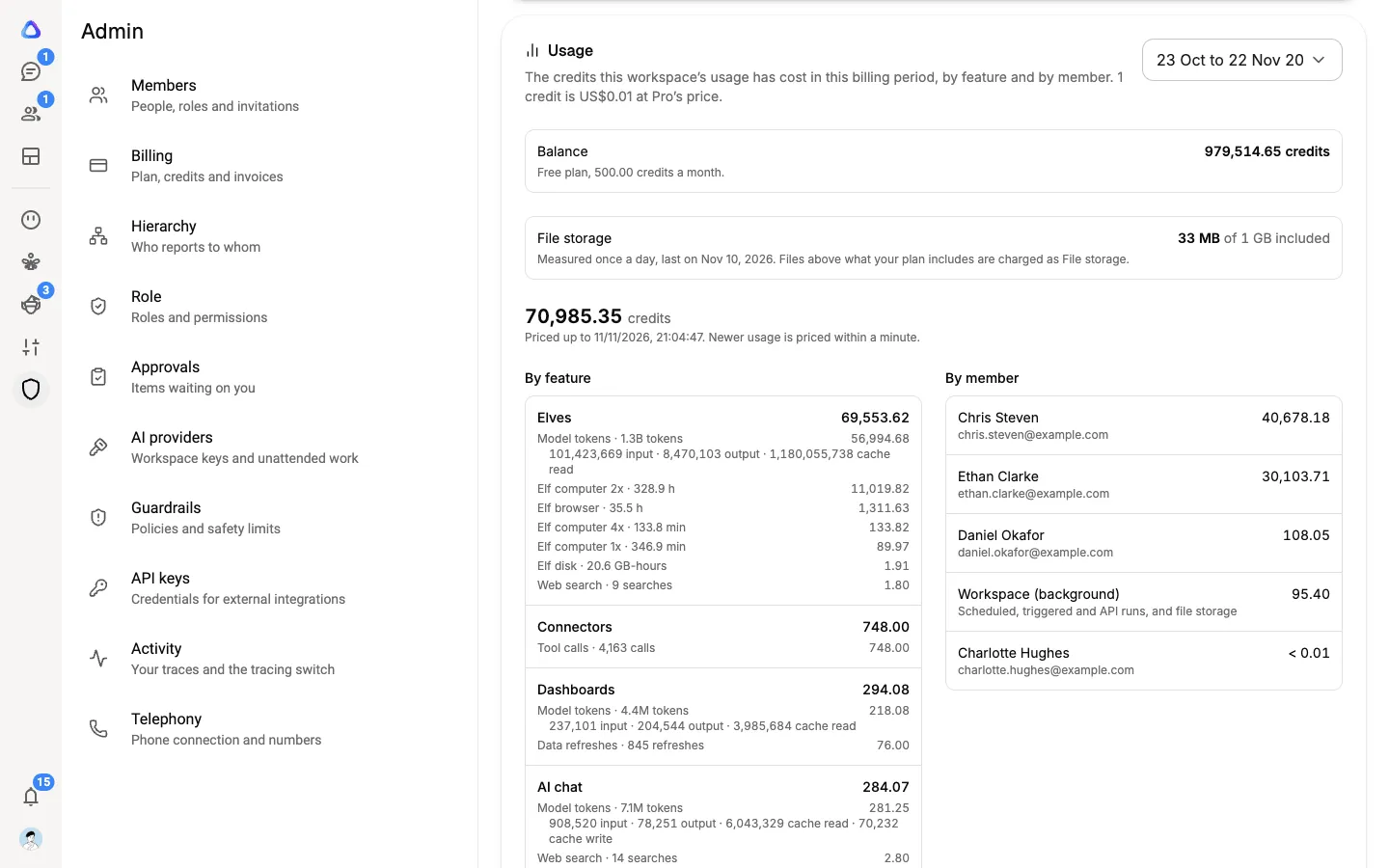
New usage appears within about a minute. Each member can see their own usage in Settings → My usage. See Your usage.
Buy a top-up
Section titled “Buy a top-up”Top-ups are charged now to your default card, at your plan’s price per credit. Where tax applies to your billing address, it is added on top of the amount you choose, so the credits you get stay the same:
| Plan | Price per extra credit | What US$ 20 buys |
|---|---|---|
| Free | US$ 0.012 | About 1,666 credits |
| Pro | US$ 0.011 | About 1,818 credits |
| Max | US$ 0.009 | About 2,222 credits |
To buy one you need permission to manage billing, which the Owner and the built-in admin role template have.
-
Select Admin in the rail, then Billing.
-
On Top up, select an amount, or type your own in Other US$. It’s whole dollars, from US$ 20 to US$ 10,000. The card shows how many credits it buys.
-
Select the button that reads Buy and the number of credits.
-
Check the total and the card it’s charged to. The dialog works out the total with any tax before you pay. Then select Pay, which names that total, such as Pay US$ 50.00. If you have no card or billing address yet, the dialog offers Add a card or Add the billing address first.
The credits are added straight away, or within a moment if your bank asks you to confirm the payment.
Low credit alerts
Section titled “Low credit alerts”The Owner and workspace administrators get a notification when the workspace has 20%, 5% and 0% of the period’s credits left. Each alert is sent once per period.
When credits run out
Section titled “When credits run out”When the balance reaches zero, new work is refused with This workspace has used all its credits for this period. Ask an admin to add more.
Work that’s already running finishes and is still counted, so the balance can go a little below zero. The next credits the workspace gets pay that back first. Buy a top-up to carry on straight away, or move to a bigger plan.