
Agents
An agent is an AI set up for one kind of job. It has its own instructions, its own model, and the skills, plugins and apps it needs. You can chat with an agent whenever you need it, or hand it a piece of work as a breakaway and review what it sends back.
Three kinds of agent
Section titled “Three kinds of agent”| Kind | What it is | Where you get it |
|---|---|---|
| Atlato One | The built-in agent for longer jobs. It plans the work, checks its plan, does it and hands over a summary. | Already in your list, marked System |
| Atlato agents | Ready-made agents for common jobs, written by Atlato and kept up to date. | Add them from the Agents gallery |
| Your own agents | Agents you or your teammates set up. | Build one, or add one a teammate shared |
Find your agents
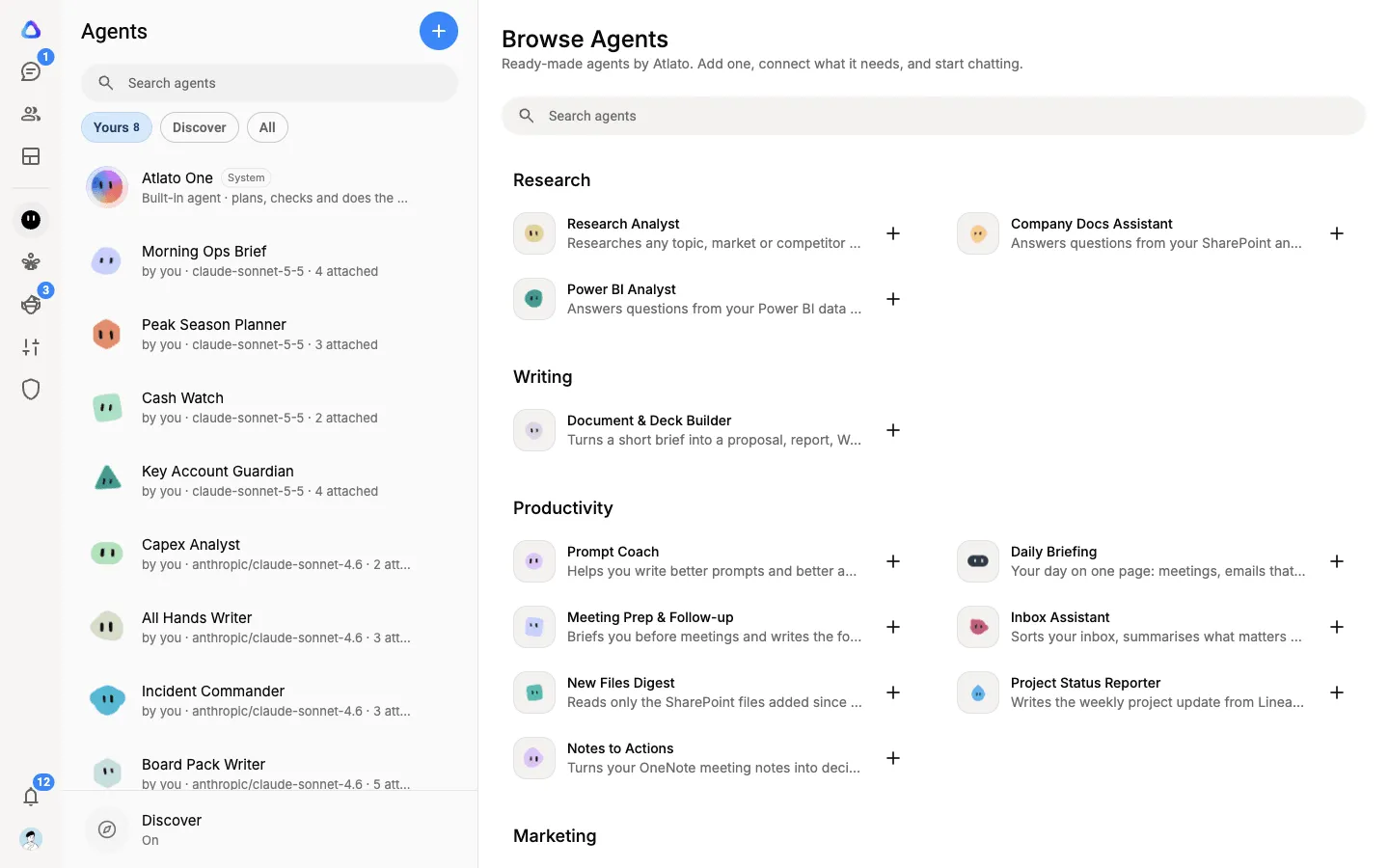
Section titled “Find your agents”Select Agents in the sidebar. The column lists your agents, with chips across the top:
- Yours: the agents you made or added, with Atlato One first.
- Discover: agents your teammates have shared with you. Select + on one to add it to Yours.
With no agent open, the main area shows Browse Agents, the gallery of Atlato agents.
Chat with an agent
Section titled “Chat with an agent”Select an agent to see your chats with it. Chat at the top is your ongoing chat with that agent. Select New chat to start a separate one for a different topic, and use Search chats to find an old one.
Type your request, attach files if they help, or use your voice. While an agent works, its row shows what it is doing, for example Working….
An agent sometimes stops to check with you:
- Needs your answer: it asked a question. Answer it on the card in the chat.
- Needs approval: it wants to take an action, such as sending something through one of your apps. Approve or decline the step to let it continue.
Give an agent a piece of work
Section titled “Give an agent a piece of work”Hand an agent a breakaway from any of your AI chats. It starts straight away in a chat of its own, hands the result back when it is done, and waits for you to approve it. See Who can take a breakaway.
What an agent runs on
Section titled “What an agent runs on”An agent always uses its own model, and it runs on your AI connection for that model: your own subscription or API key from the company that makes it. Your chats with it, and breakaways you hand it, count against your own credit limit.
If none of your connections serves the agent’s model, you see Compatible model not found. Connect a subscription or an API key for that model in your AI providers. See Compatible model not found.
When more than one of your connections can run an agent, open the agent’s menu (⋮) and select Runs on… to choose. Automatic uses a subscription first, then an API key.
Atlato One is the exception: it runs on keys an admin sets up for the workspace. See Atlato One.
What an agent remembers
Section titled “What an agent remembers”Agents learn things about you as you chat. To see or change what an agent has learnt, open its menu (⋮) and select Memory. What it learnt in your chats is visible only to you, and you can also tell it something to remember.