
Atlato One
Atlato One is the built-in agent for longer, multi-step jobs. Give it a task and it makes a plan, checks that plan, does the work with the tools and apps it can use, and then hands over a summary of what it did. It suits work you would otherwise break into many separate requests.
Before you begin
Section titled “Before you begin”Atlato One runs on API keys an admin sets up for the whole workspace, not on your own AI connection. It needs either:
- an Anthropic (Claude) API key and an OpenAI API key, or
- one OpenRouter API key, which covers both.
An admin adds these in Admin → AI providers and turns on Use for unattended work for them. Your own subscriptions and API keys don’t count here, so connecting one of yours won’t make Atlato One work. See AI providers for the workspace.
Open Atlato One
Section titled “Open Atlato One”Select Agents in the sidebar. Atlato One is the first agent under Yours, marked System, with the line “Built-in agent · plans, checks and does the work”. Select it to open your chats with it.
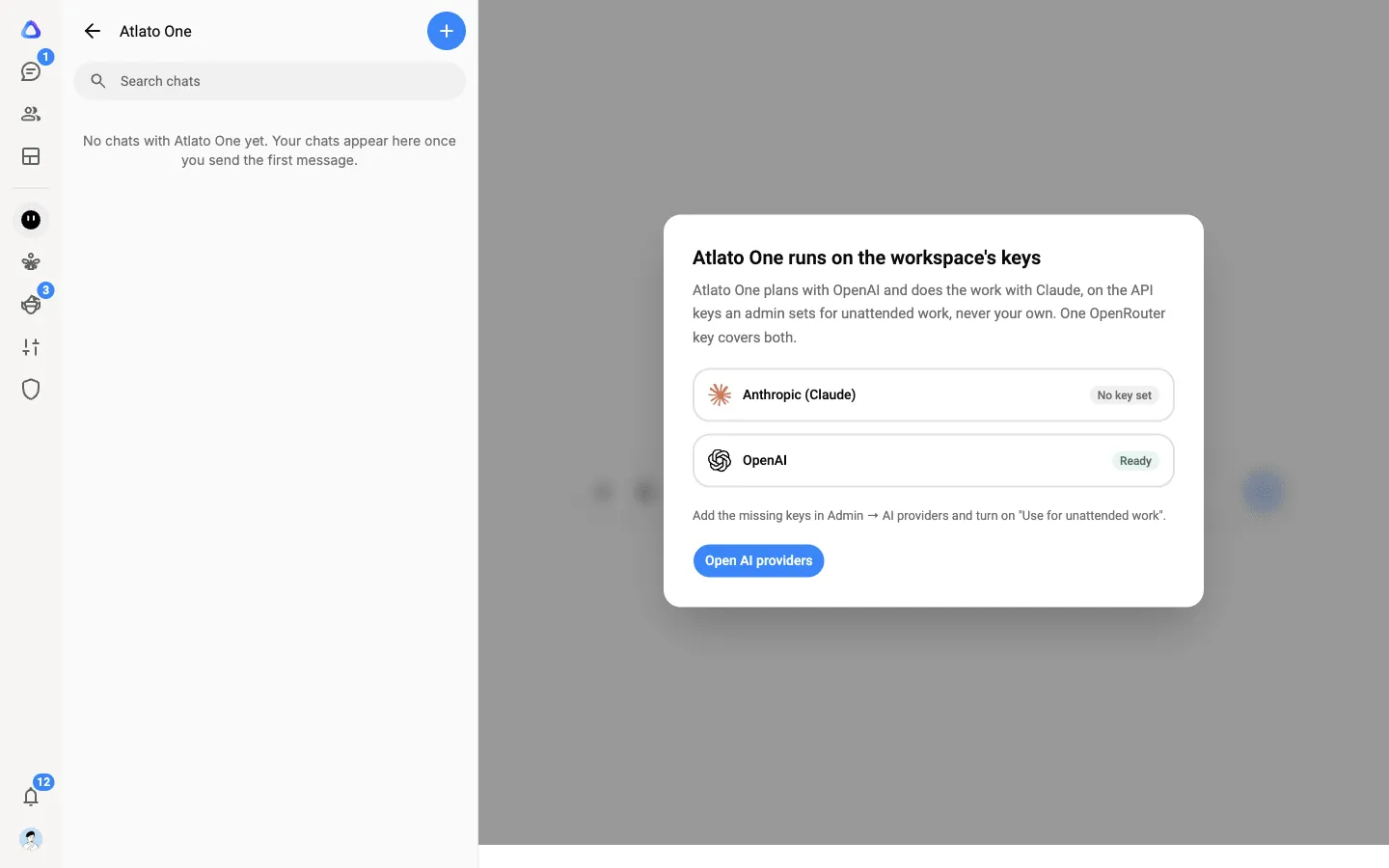
If the workspace’s keys aren’t ready, its chat is covered by a notice, Atlato One runs on the workspace’s keys. It lists each provider it needs with its state: Ready, Missing a model or No key set. If you can manage AI providers, select Open AI providers to fix it. Otherwise, ask an admin.
Give it a job
Section titled “Give it a job”-
Open Atlato One and type the task. Say what you want at the end, not only the first step: “Research our three biggest competitors’ pricing and put it in a one page PDF.”
-
Attach any files it should work from.
-
Send it. Atlato One plans the work, checks the plan, and starts. Its row in your Agents list shows what it is doing while it works.
-
If it needs something from you, it stops and asks. Answer the question on the card in the chat, or approve or decline the step it wants to take, and it carries on.
-
When it finishes, it hands over a summary of what it did, with any files it made.
You can keep several jobs apart: select New chat to start a separate chat with Atlato One.
Hand it a breakaway
Section titled “Hand it a breakaway”You can also give Atlato One a breakaway from any of your AI chats. In the list of who can take it, Atlato One is first under Agents (“plans, uses your tools, asks when it needs to”). It starts on its own, hands the result back to your chat when it is done, and waits for you to approve or reject it.
What it costs
Section titled “What it costs”Because Atlato One runs on the workspace’s keys, its work is charged to the workspace, not to you, and it doesn’t use up your own credit limit. It shows as Atlato One in the workspace’s usage. See Credits and top-ups.
What it knows about you
Section titled “What it knows about you”Atlato One uses your own Memory, the same one your AI chats use, rather than keeping a memory of its own. To see or change it, open Atlato One’s menu (⋮) in your Agents list and select Memory, or go to Memory.